A yearly calendar reminder used to be a workable way to manage a small collection of SSL certificates. Shorter lifetimes change that calculation. The extra work is not just ordering another certificate: someone, or something, must prove domain control, install it in the right place and check what visitors actually receive.
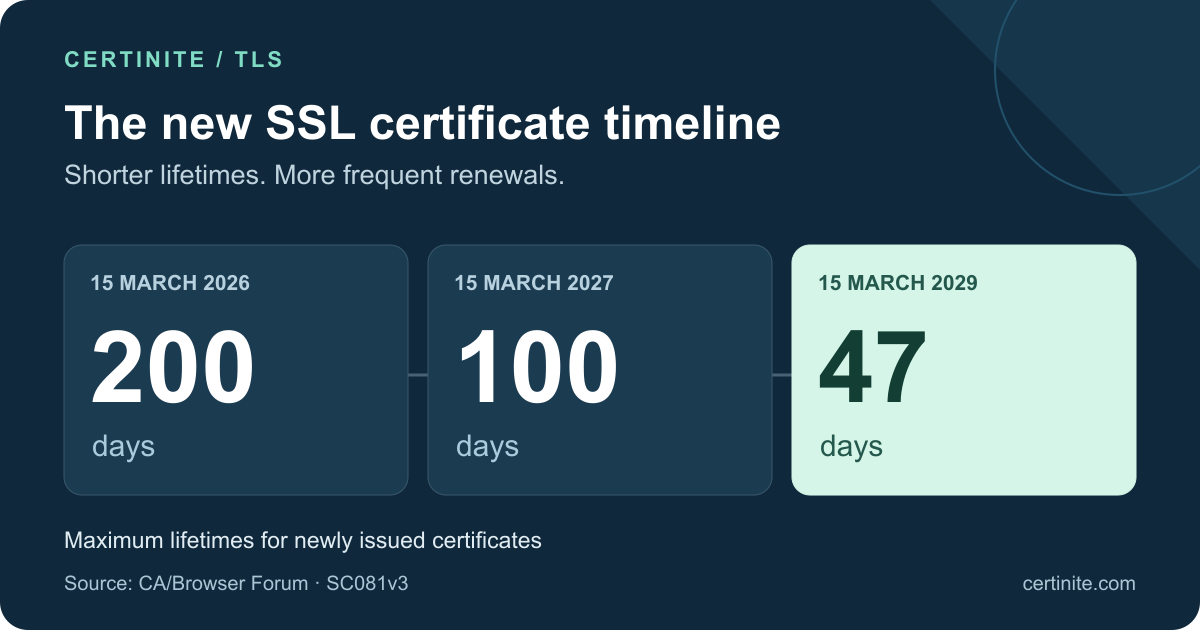
The short answer: The maximum lifetime of publicly trusted TLS server certificates fell to 200 days on March 15, 2026. It falls to 100 days on March 15, 2027, and 47 days on March 15, 2029. These are ceilings for newly issued certificates, not a promise that every provider will issue for exactly that long. The CA/Browser Forum adopted the schedule in Ballot SC081v3.
For an IT team, the useful question is practical: which part of the next renewal still depends on a person being available?
When do SSL certificate lifetimes change?
| Certificate issuance date | Maximum validity |
|---|---|
| Before March 15, 2026 | 398 days |
| March 15, 2026 – March 14, 2027 | 200 days |
| March 15, 2027 – March 14, 2029 | 100 days |
| March 15, 2029 onward | 47 days |
As of October 17, 2026, the industry is in the 200-day phase. The table follows section 6.3.2 of the TLS Baseline Requirements.
Does the order date or issuance date matter?
Issuance determines the limit. Ordering earlier does not preserve the old lifetime. Existing certificates do not have their expiry rewritten at the transition. DigiCert confirms this for its change; revocation for a separate reason remains possible. DigiCert transition guidance
Why do providers advertise 199, 99 or 46 days?
Providers can issue below the ceiling. DigiCert describes using one day less to avoid exceeding it. Schedule from the delivered certificate’s notAfter value, not its product label. DigiCert validity table
Why make certificates shorter lived?
Domains, infrastructure and private keys change hands. When a certificate is issued incorrectly or its key is compromised, a shorter lifetime reduces how long that certificate can remain useful. It also encourages repeatable renewal. Let’s Encrypt explains both motivations in its certificate lifetime rationale.
Shorter validity is not a complete incident response plan. Continuing to reuse an exposed private key does not make the exposure disappear. Revocation, key replacement and incident investigation still have distinct jobs to do.
The day-to-day benefit depends on execution. A renewal pipeline that works reliably makes the change almost invisible to visitors. A workflow built around emailing a PFX file to the one person with server access becomes much harder to sustain.
Is the 47-day limit the same as Let’s Encrypt’s 45 days?
No. 47 days is the industry ceiling scheduled for 2029. Let’s Encrypt has its own earlier move to 45 days. Its announced milestones are:
- May 13, 2026: 45-day certificates for the optional tlsserver profile.
- February 10, 2027: 64-day certificates for the default classic profile.
- February 16, 2028: 45-day certificates for the default profile.
See Let’s Encrypt’s transition announcement. An old headline about a universal 90-day limit does not describe the adopted schedule.
Its October 7, 2026 update schedules 64-day certificates in staging for October 14, 2026. Check your client’s ACME Renewal Information (ARI) support. Without ARI, the provider recommends renewing around two thirds of the way through the lifetime instead of using fixed day counts. Let’s Encrypt’s 64-day update
Domain validation has a separate clock
Certificate validity describes the issued certificate’s lifetime. Validation reuse describes how long an authority may rely on earlier domain control evidence for new issuance.
Maximum domain/IP validation reuse becomes 200 days in 2026, 100 days in 2027 and 10 days in 2029. Organization identity has separate rules. Baseline Requirements, section 4.2.1
This does not require installing a certificate every ten days. A later order may need fresh evidence. Automating certificate downloads while depending on a manual DNS change covers only part of the job.
What should you check for HTTP and DNS validation?
Let’s Encrypt’s HTTP-01 challenge uses port 80 and cannot issue wildcards. DNS-01 uses TXT records and supports wildcards. Consider DNS API permissions and propagation time. Let’s Encrypt challenge documentation
Use your own traffic path to review the setup:
- CDN or load balancer: Which node receives the challenge, and will another node serve the same answer?
- DNS API: Is the credential scoped to the required zone, and who can replace it if access changes?
- External DNS administrator: Will an unattended renewal have to wait for a support ticket?
- WAF or firewall: Will a new rule break validation, and how will your team hear about it?
Our HTTP-01 and DNS-01 guide covers the choice in more detail.
Are paid, wildcard and multi-domain certificates affected?
Price, DV/OV/EV validation and wildcard/SAN coverage do not exempt publicly trusted TLS server certificates. Private internal PKI, code signing and S/MIME are outside this TLS schedule’s scope. CA/Browser Forum scope
For wildcard deployments, the installation list deserves particular care. If the same certificate is used on several endpoints, all of those copies must be accounted for. Seeing a new certificate in a dashboard does not prove that a reverse proxy has stopped serving an old one. See the wildcard certificate management guide.
What does buying a one-year SSL plan mean now?
A subscription term and a certificate’s validity period are different things. A plan may include successive shorter certificates. DigiCert’s multi-year plan is one example; check each product’s own terms. DigiCert plan guidance
Ask these questions separately when comparing quotes:
- Which service or subscription period does the price cover?
- Are reissues included during that period?
- Who performs validation and installs each new certificate?
- What support is available if deployment fails?
A low certificate price may still leave substantial manual work. Conversely, if your hosting provider already handles validation, installation and monitoring, you may not need another product for the same endpoint. The SSL pricing guide discusses purchase price alongside operating effort.
Five steps to a complete renewal
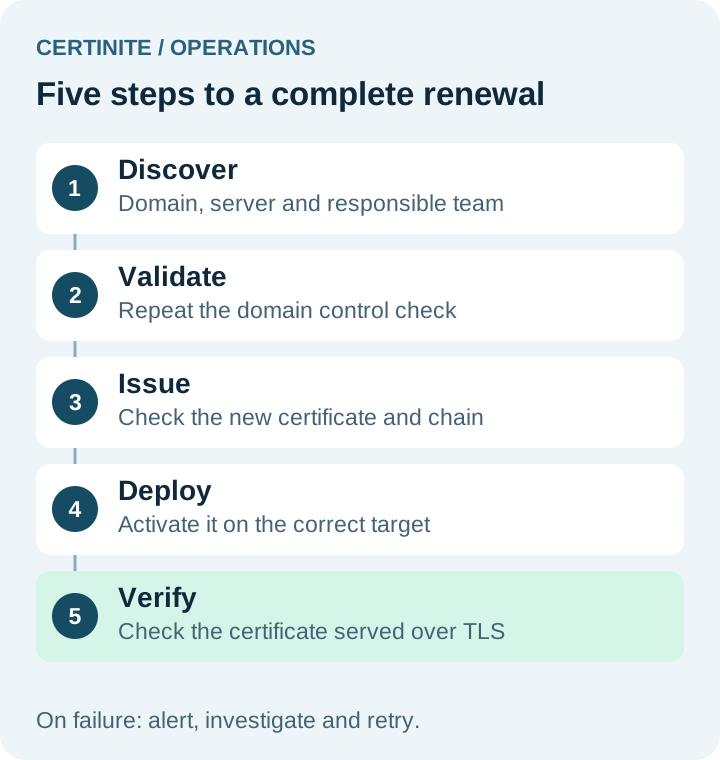
Every step needs an owner and a failure path. “Certificate issued” does not establish that the live installation has changed.
1. Discover. Record the domain, expiry, server, application owner and TLS termination point. A CDN, load balancer and origin may each present different certificates.
2. Validate. Choose a method that can repeat domain control checks. A successful first setup does not prove that DNS permissions will still work months later.
3. Issue. Check the names, private-key match and expected certificate chain before installation.
4. Deploy. Update the right IIS binding, Nginx/Apache files or certificate store at the TLS terminator. Include any reload or activation step required by the target.
5. Check the live endpoint. Connect using the hostname and SNI visitors use. Does the served certificate have the expected fingerprint and expiry? If not, who receives the failure?
Keeping these stages distinct makes “renewal succeeded but the site still has the old certificate” much easier to investigate. The PEM and PFX guide explains common deployment formats.
A planning example with 100 certificates
Suppose an agency manages 100 certificates. If it plans roughly monthly replacement for future 45-day certificates, it will handle about 100 × 12 = 1,200 certificate deployments a year. This is an illustrative workload calculation, not a customer measurement or a mandatory renewal interval.
It also counts certificates rather than every installation point. If each certificate is deployed to three servers, there are more endpoints to verify. The useful question becomes less “how quickly can we download a certificate?” and more “how do we detect and recover a failed deployment?”
The first improvement may be an accurate map of certificate-to-server relationships. Another reminder in a calendar cannot tell you where the forgotten third copy lives.
A preparation plan before 2027
Week one: complete the inventory
Collect production domains, test environments, APIs and customer portals. For each certificate, record its expiry, authority, validation method, installation targets and responsible team. Resolve records with no clear owner first.
Week two: pick a small pilot
Use a low-impact domain to exercise issuance, deployment and a second renewal. Confirm the result with an external TLS check as well as the management interface. Test failure scenarios in a test environment; do not deliberately let a production certificate expire.
Week three: finish the failure path
Account for revoked DNS access, offline servers and rejected deployments. Define retries, notifications, access ownership and recovery to a working configuration. A team member taking leave should not prevent renewal.
Week four: expand in measured batches
Add similar servers in small groups. Track the last successful renewal, failed installations and targets awaiting intervention. Set alerts around the certificate’s actual lifetime and your response time rather than copying assumptions from an older 90-day workflow.
Where to start in Certinite
Start with the certificate inventory, then choose the installation connection: an Agent on the server or a Gateway managing configured targets. Evaluate the validation method, access permissions and supported deployment format together.
Gateway targets include IIS, Nginx, Apache and HAProxy. The current Gateway installation workflow is for a single domain; buying a wildcard/SAN product does not mean every target can deploy it through that same workflow. Check the product and target compatibility in the installation screen.
Explore centralized certificate management or use the setup documentation to choose a route for your environment. The useful first milestone is a repeatable second renewal, as well as a successful initial order.
Frequently asked questions
Will my current certificate be revoked on the transition date?
The lifetime schedule does not rewrite an existing expiry. Monitor the certificate and provider notices. Revocation following key compromise is a separate matter.
Will every SSL certificate have a 45-day lifetime in 2028?
No. That date belongs to Let’s Encrypt’s default-profile plan. Keep provider policy separate from the industry maximum.
Do I have to pay again for every renewal?
That depends on the plan. Subscription expiry, reissue entitlement and individual certificate expiry are separate items. Ask about reissue and installation charges.
Is enabling automatic renewal enough?
No. Validation can succeed while installation fails or a service continues serving the previous certificate. Live endpoint checks and failure notifications belong in the workflow.
Does a 47-day certificate use weaker encryption?
Validity is a different property from the encryption algorithm or key size. A shorter lifetime alone does not imply weaker encryption.
Does a shorter-lived or paid certificate improve Google rankings?
Its price or lifetime is not a promise of a higher position. Keep HTTPS working for visitors. Google explains that even good page experience alone does not guarantee top rankings. Google Search Central
Sources and review date
Schedules and provider announcements were checked on October 17, 2026. Consult the primary sources below for subsequent changes. The workload example and preparation plan are operational suggestions developed for this guide.